Query
Query table is a System Table, if you want to know more about, please check the System Tables documentation.
Users can write SELECT type queries to use them in other MakerMike tables such as Portlet and Service.
Overview
- Queries allow you to read data from any table in your project.
- Query table uses MakerMike Query Language (MMQL), which supports the following keywords:
- WHERE
- AND
- OR
- GROUP BY
- ORDER BY
- LIMIT
- Permissions from all the selected columns are validated.
- Queries can receive parameters from Portlets and Services.
Columns available
name
The name you wish to assign to this query.
mmql
MakerMike Query Language (MMQL) is a programming language based on SQL, that allows you to write queries to get data from any table in your project. You can execute queries and use the results in other system tables such as Portlet and Service.
Take a look at the following diagram to better understand what you can achieve with MakerMike Query Language:
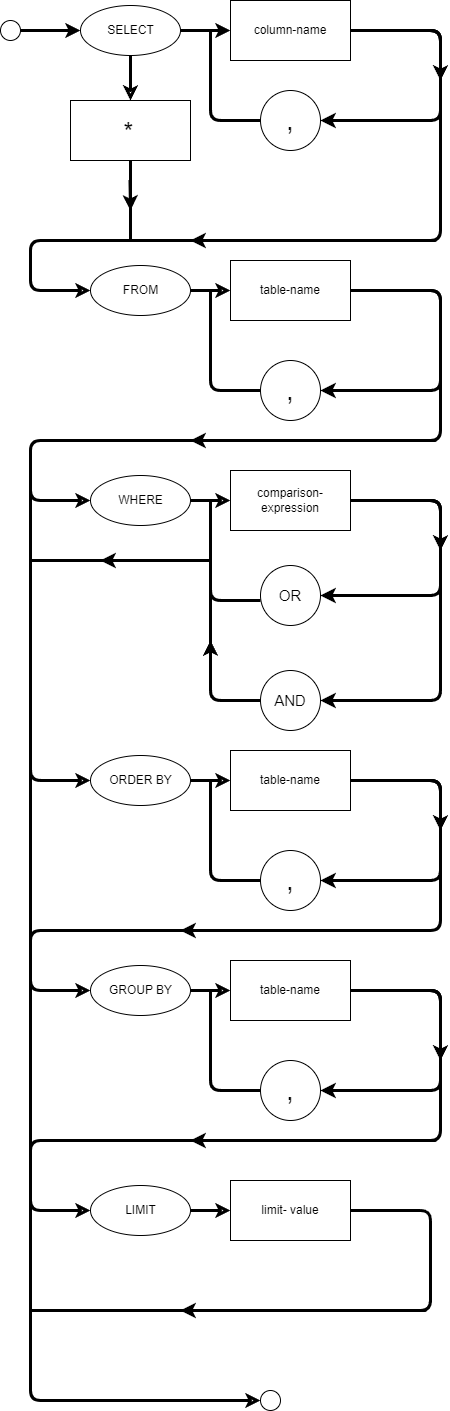
Writing a query
- Asterisk
*is allowed to select all columns from the desired tables. - New lines are supported between query elements.
- Tabs are allowed between query elements.
- Multiple spaces are allowed between query elements.
- Keywords can be written in lower and upper case.
- Semicolon
;at the end of the query is optional.
Examples
Example 1
SELECT name, value FROM to_do WHERE name != "task1" group by name, value ORDER BY name, value LIMIT 100;
Example 2
select to_do.name, to_do.value from to_do where to_do.name!="a" group by to_do.name, to_do.value order by to_do.name, to_do.value limit 100;
Troubleshooting
If your query has a syntax error or you reference a table or column that does not exist in your project, a small section of the query where the error occurred will be displayed, and a caret symbol ^ will indicate where in the section the error is.